
 Jesse Hitt • 02 Oct 2025 • 8 min read
Outgrowing QuickBooks and Spreadsheets? What to Look for in Association Management Software

If you’re an association or property management company (PMC) juggling multiple HOAs with QuickBooks, Google Drive, and sheer willpower, you’re not alone. Most small to midsize community association companies (CAMs) and PMCs start with general tools because they’re affordable, familiar, and “good enough.” Until they’re not.
Eventually, the cracks start to show: reconciliation nightmares, scattered documents, board members demanding reports you can’t easily generate. That’s just on the financial side. Mail, mass communications, invoicing, and violations each have their own app or spreadsheet. Not to mention the one-off texts and emails.
It’s impossible to manage as you add more communities to your client roll.
It’s more than frustrating. I can cost you in missed deadlines, unhappy clients, and too much time spent fixing things that shouldn’t be broken. That’s time you could be using to grow your business, onboard your next community, or finally take a Friday off.
That’s when it’s time to ask the big question: Is it time to graduate to community association management software? Because when it comes to association management software at scale, a disconnected software stack can’t handle the nuances.

Key Takeaways
- When you’re juggling multiple HOAs, you need the kind of features from your association management software that QuickBooks and other generic tools like spreadsheets can’t offer.
- Community association management software like PayHOA streamlines financials, communication, and daily operations—all under one login.
- Built-in resident and board portals reduce support requests, increase transparency, and keep everyone on the same page.
- Automation features like recurring dues, vendor payments, and late fee reminders save your team hours each week.
- If you’re spending more time managing your tools than your communities, it’s time to graduate to purpose-built software.

Why QuickBooks + Spreadsheets Falls Short for Growing CAMs
QuickBooks is great for what it was designed to do. If you’re a small business managing bookkeeping, invoices, payroll, and tax prep, it’s a workhorse.
So is Excel, Google Sheets, or whatever other small business accounting software you use to prevent you from having to track it on a paper ledger
But HOAs aren’t businesses in the traditional sense, and managing them requires a very different toolkit. And to be fair, neither QuickBooks or spreadsheets ever claimed to be an HOA management solution.
As your management company grows, the pain points of forcing HOA operations into generic financial and accounting software become harder to ignore. Each association you manage needs its own QuickBooks company file, which means your staff spends their day hopping between siloed records just to check a balance or generate a report. There’s no clean, portfolio-wide view, and instead, just a maze of logins, spreadsheets, and manual workarounds.
And dues collection? Without built-in automation designed for community associations, your team is stuck sending individual reminders, tracking paper checks, and redirecting homeowners to clunky third-party portals. It’s inefficient, it’s error-prone, and it’s certainly not scalable.

When the board asks for financials, you’re often left scrambling. QuickBooks generates generic business reports, not HOA-specific insights, and certainly not in a format that a volunteer board can quickly understand. Instead of looking like a polished operation, you’re explaining why the P&L doesn’t reflect reserve fund activity and manually stitching together context.
Excel, Google Sheets, and other generic spreadsheet programs give you more flexibility, but you have to build it yourself, and it’s nearly impossible to replicate across dozens of communities. As for using spreadsheets to create easy-to-read reports—forget about it.
All of this adds up, not just in hours lost, but in credibility. And if you’re building your business on referrals, reputation, and retention, that’s a risk you can’t afford to carry.
The truth is many property and association management companies start with QuickBooks and spreadsheets, but it was never meant to be an association management software. Both are more generic software and not specifically built for community association management needs. HOAs need more comprehensive association management software that a bunch of cobbled-together generic solutions simply can’t match in functionality.
Forbes breaks it down: accounting software may handle the books, but association management software handles the business.
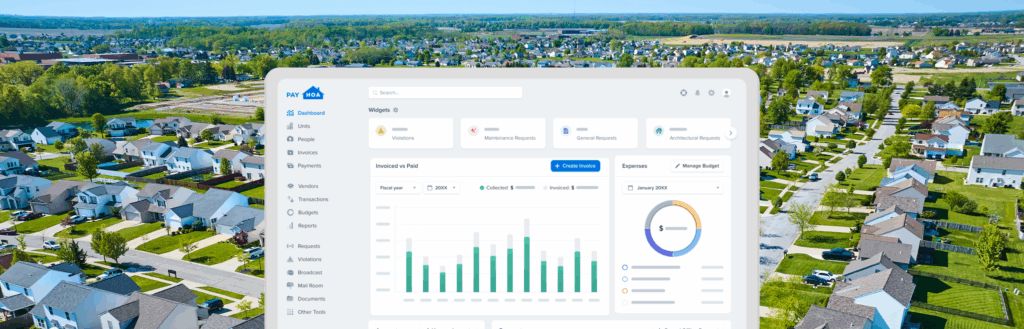
PayHOA is a platform for running a portfolio of communities. The live dashboard is designed specifically for managing associations, where your entire team and clients can access the information they need. See how PayHOA compares to QuickBooks here.

How PayHOA Beats Generic Solutions for PMCs and CAMs
Running a single HOA is already complicated. Bouncing between a handful of apps—Dropbox, QuickBooks, Spreadsheets, (not to mention Facebook and Nextdoor)—is manageable for a community or two. But running a portfolio of them? That’s an entirely different business model.
That’s where a purpose-built community association management platform like PayHOA comes in. Unlike generic financial and accounting software, PayHOA is designed specifically for PMCs and CAMs and the communities they serve. Every portal, every ledger, and every report is tailored to the workflows that managers navigate every day. For management companies looking to modernize without overwhelming their staff or boards, HOA software is a strategic upgrade worth embracing.
All-in-One, Community-Specific Software
Forget juggling 10 tabs. PayHOA centralizes your portfolio:
- General ledger, automated dues, vendor payments, and financial reports—all in one place.
- Multi-association management under one login (finally).
- Centralized communications for each community.
- Owner portals for easy payment and communication.
- Voting, polls, and calendar tools for community organization and feedback.
Instead of building elaborate workarounds in QuickBooks, Dropbox, Facebook Groups, Google Forms, and spreadsheets, or storing documents across multiple apps, your team gets a single source of truth. That means less friction, fewer mistakes, and far more time to focus on strategy, not just survival.

Resident and Board Tools Included
This is where PayHOA stands apart. It’s not just a tool for your accounting team. It’s a resource for both homeowners and board members. When residents can log in to a portal to make payments, submit service requests, or review governing documents, your inbox gets quieter. You’re no longer the go-between for every minor concern, and your staff isn’t stuck fielding the same five questions week after week.
When board members have easy access to the tools and information they need, governance gets easier and trust increases. A recent Forbes article compared HOA dysfunction to corporate governance breakdowns, noting that poor transparency and disorganized systems often lead to frustration, confusion, and finger-pointing.
With PayHOA, board members get their own secure portal as well, with one-click access to financial reports, meeting notes, violations, and more. Instead of sending PDFs as attachments that go ignored (or get lost in someone’s inbox), they can pull the information themselves, on demand. The reports are tailored to be readable by non-accountants, so you’re not spending precious time explaining what a line item means.
HOA software helps streamline compliance with community bylaws and state regulations, eliminating the need to dig through old emails or outdated PDFs. You look prepared, professional, and proactive—especially when the board doesn’t have to ask twice. Even better? Sometimes they don’t have to ask at all.
Automation That Understands Community Association Workflows
PayHOA eliminates the repetitive admin tasks that bog down your team.
You can set and forget recurring dues cycles, automate reminders and late fees, and schedule vendor payments with ease. Reconciliation becomes a quick check instead of a multi-day process. Even better, the system is designed to understand how HOAs function, so it automates based on real-world workflows, not rigid templates.
The result? Your team isn’t babysitting software; they’re managing communities.
Scalable and Centralized
Growth doesn’t have to mean chaos. With PayHOA, you manage your entire portfolio from one system. Staff can be assigned to specific HOAs without confusion. And you can finally scale without stacking more software and cloud storage systems to learn and manage. No more “which Google Drive is this HOA in again?” or, “I still don’t have access to that Dropbox folder!” You get one login. One system. One source of truth.
Making the Switch: What to Expect
Migrating from QuickBooks and spreadsheets to an HOA software platform sounds daunting, but it doesn’t have to be.
PayHOA offers data migration support, including vendor history, payment records, and resident info; training resources to get your team and your boards up to speed; and white-label options so your company’s brand stays front and center.
And if you’ve ever tried explaining the QuickBooks + spreadsheets combo to a newly elected board president, you already know: the switch is worth it.
You Don’t Need to Do It the Hard Way
There comes a point in every growing CAM’s journey where duct tape and determination stop being enough. If you’re spending more time managing your tools than managing communities, you’ve outgrown QuickBooks and spreadsheets.
The good news? You don’t need to reinvent the wheel. You just need software that actually understands your job.
Let PayHOA show you what purpose-built software looks like, impress your boards, and scale without stress. Explore the future of what your HOA looks like.
Book a demo and see how PayHOA can help your management company run smarter.
Share this article:
Enjoyed this Article? Try Another!

Why Banking Integration Is the Backbone of Modern HOA Management Accounting Software
Key Takeaways Managing a neighborhood’s finances can feel like trying to solve a puzzle where…
The Real Value of a Lockbox: Faster Homeowners Association Payments and Fewer Errors
Key Takeaways The image of a volunteer HOA treasurer surrounded by envelopes, paper clips, and…

Driving Adoption: How to Get Your Community to Use HOA Management Software
Key Takeaways Creating a homeowner portal for your HOA members is a challenge, but convincing…