
 Jesse Hitt • 13 Nov 2025 • 8 min read
What Is the Best HOA Software for CAMs/PMCs?
Key Takeaways
- CAMs and PMCs need more than basic accounting tools.
- Effective HOA software should streamline communication, automate operations, and support multi-property portfolios.
- Top capabilities include resident portals, document management, maintenance tracking, and real-time reporting.
- Built for scale and efficiency, PayHOA delivers robust community association management software that helps professionals run smarter, not harder.

Modern Association Managers Need Modern Software
Whether you’re overseeing two communities, twenty, or two hundred, managing HOAs today demands more than spreadsheets and scattered apps. Community association managers are under constant pressure to deliver clear communication, timely financials, and seamless operations while juggling multiple properties and stakeholders. That’s where HOA software becomes essential infrastructure rather than a convenience.
This guide breaks down what matters most in choosing the right tool for property management companies and CAMs. We explore the critical features, common frustrations, and why PayHOA stands out among leading platforms.
Spoiler: It’s about more than accounting.

What CAMs and Property Managers Really Need from HOA Software
Professional community association managers face challenges that go well beyond volunteer-led boards. At scale, issues compound:
- Generating clean, detailed financial reports for boards and auditors
- Ensuring accurate record-keeping and compliance
- Managing dues and maintenance across dozens of properties
- Responding to resident communications quickly and consistently
These tasks require more than persistence. They require systems. The best community association management software reduces busywork, enhances responsiveness, and improves visibility across every property.
Common pain points include:
- Data spread across multiple systems
- Manual invoicing and payment tracking
- No centralized recordkeeping
- Delayed responses to maintenance issues
- Communication breakdowns between board members, residents, and vendors
Without the right tools, small inefficiencies snowball into missed deadlines, financial missteps, or resident dissatisfaction. CAMs and PMCs need a solution that consolidates operations into one intuitive platform. That means more time solving problems and less time chasing paperwork.
Must-Have Features for CAMs and PMCs
When evaluating community management software, look for platforms that provide both the depth and flexibility to meet your growing needs. The best systems offer:
- Portfolio dashboards to manage multiple associations from a single login, giving managers a bird’s-eye view of all communities
- Automated invoicing and payments, including ACH, credit, and autopay features to reduce manual tasks and improve on-time payment rates
- Robust reporting, with exportable financial and operational reports for boards, CPAs, and auditors
- Violation tracking with templates, photo uploads, and status workflows to streamline enforcement while maintaining consistency and documentation
- Resident portals where homeowners can access documents, pay dues, and submit maintenance requests, which makes community interaction frictionless
- Work order management, including vendor scheduling, communication, and task tracking, so managers do not lose track of essential repairs and service tickets
- Built-in accounting tools or seamless integration with third-party accounting systems like QuickBooks
- Custom user permissions for staff, board members, and vendors to ensure appropriate access and security
- Voting and surveys for streamlined board decisions and community feedback
- Website management and building tools for a professional and up-to-date community online presence
Additionally, features such as mobile access, bulk messaging, and custom branding enhance usability for your internal team and the communities you serve. Software should simplify, not complicate, your daily work.
Explore how these features compare in our guide to HOA software.
What Sets PayHOA Apart for Managers
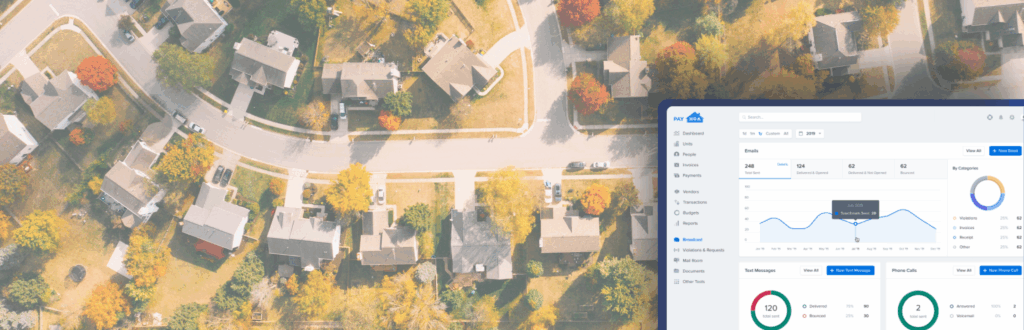
PayHOA is more than just community management software. It works as a digital property management company in your corner. While many platforms were built for volunteers or retrofitted for pros, PayHOA was designed to support both, which makes it uniquely powerful for CAMs and PMCs.
Here’s how PayHOA supports professional managers:
- Integrated accounting features, from general ledgers to bank reconciliation, built specifically for HOAs
- Unified portfolio tools that let you oversee multiple associations without switching accounts
- Role-based permissions so you can control access for staff, board members, and vendors with confidence
- Secure document sharing and communication tools that keep everyone aligned and up-to-date
- Dedicated training and support tailored for CAMs managing complex portfolios
Thousands of professionals use PayHOA to streamline communication, compliance, and collections. It scales with your business and adapts to your workflow. Unlike rigid or overly complex systems, PayHOA is flexible and intuitive. You spend less time in the software and more time delivering value to your clients (which should help you grow your business portfolio in the long run).
You can also explore how PayHOA simplifies finances in our post on HOA finances.
Collaborating with Boards
Board collaboration is vital. CAMs need to provide board members with up-to-date reports, voting tools, and easy access to community documents. With PayHOA, managers can grant permission-based access to board members, ensuring transparency without overwhelming them with admin tools. This level of visibility builds trust and makes board meetings more productive.
Integrating with Vendors
Professional managers frequently work with external vendors, including landscaping, maintenance, legal, and insurance partners. The ability to manage vendor relationships from the same platform is a game-changer. PayHOA allows managers to:
- Upload and track vendor contracts
- Schedule recurring services
- Process vendor invoices and payments from within the platform
Security, Compliance, and Data Governance
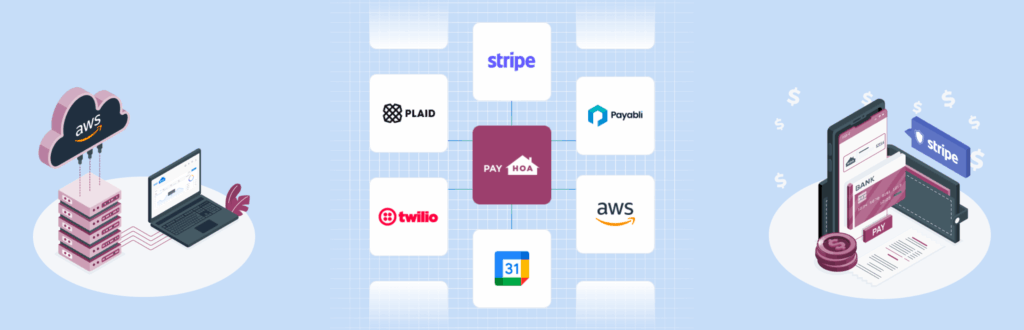
Security must be part of the evaluation. Resident data, banking details, and violation records require careful handling. When comparing platforms, confirm that the provider offers bank-grade encryption, role-based access controls, and clear audit trails. Ask about data backups, retention policies, and how the system supports annual audits. Look for permissioning that limits sensitive financial report views to the right users and for reporting that lets CPAs review transactions without granting full admin access.
It also helps to align software practices with recognized guidance. Resources from the U.S. Department of Housing and Urban Development (HUD), the Community Associations Institute (CAI), and the National Association of Housing and Redevelopment Officials (NAHRO) provide helpful context for governance, resident communications, and financial transparency. A strong platform should make it easier to follow these best practices rather than forcing workarounds.
Pricing Models and ROI
Pricing varies across community association management software. Some vendors charge per unit, some use tiered plans, and others bundle payment processing. The right question is not only “What does it cost?” but also “What does it replace?” If a platform reduces delinquency through automated reminders, consolidates email and ticketing, and eliminates double entry, the return can far exceed the subscription fee.
Build a simple ROI model as you evaluate options:
- Estimate the time saved per community each month on invoicing, reporting, and maintenance coordination
- Add expected gains in on-time payments from features like autopay and reminders
- Include costs avoided by retiring redundant tools and technology
Migration and Onboarding Checklist
Switching systems can feel daunting, yet a structured approach keeps it simple. Use this checklist to guide your rollout:
- Inventory your data. Export owner rosters, payment histories, violation logs, vendor lists, and governing documents.
- Clean before you import. Remove duplicates, standardize addresses, and confirm balances.
- Set roles and permissions. Define who can view financials, send communications, and approve expenditures.
- Configure automations. Establish invoice schedules, late-fee logic, and reminder cadences.
- Pilot one community. Validate workflows with a cooperative board. Then scale!
- Train stakeholders. Offer short sessions for managers, board members, and vendors.
- Communicate with residents. Announce the new portal, share how to pay, and provide a clear support path.
- Measure success. Track on-time payments, ticket resolution times, and board satisfaction after 30, 60, and 90 days.
This approach reduces risk while building momentum. It also creates useful documentation and processes as your portfolio grows.
Choosing the Right Software for Long-Term Growth
The right platform should not only meet today’s needs but also support tomorrow’s ambitions. As your firm grows, you will need software that can scale without creating roadblocks. When comparing options, ask:
- How many communities does it support?
- Does it offer third-party access for vendors, CPAs, and boards?
- Can you automate repetitive tasks and reporting?
- Will it eliminate the need for future migrations?
- Is onboarding and training available for new staff?
- Does the roadmap align with where your firm is headed?
Scalable community association management software enables you to grow without sacrificing quality. It gives your team room to take on new communities and clients without doubling your admin workload. Whether you’re a solo CAM or a multi-manager firm, choosing scalable software is a decision that protects your bottom line.
For more guidance on finding a management solution that fits, review our explainer on what to look for in HOA management.
Run Smarter, Not Harder
Choosing the best community association management software is more than a tech decision. It is a business strategy. The right platform helps CAMs and PMCs deliver better service, improve communication, and save time.
With PayHOA, you get intuitive tools built for pros, flexible support models, and the infrastructure to scale confidently. If you’re ready to lead with clarity and control, schedule a demo with our team.
Share this article:
Enjoyed this Article? Try Another!

From Dirt to Doors: Successful Community Association Management During Developer Transitions
Key Takeaways If you’re a parent, you probably remember the hospital exit moment. They kick…

From Paper to Platform: Why Financial Automation Is Non-Negotiable for HOAs
Key Takeaways Nobody volunteers for an HOA role because they dream of reconciling bank statements…
Stop Juggling Tools: The Reality of Homeowners Association Management
Key Takeaways The Digital Balancing Act You likely stepped up to serve on your board…