ArticleSoftware & apps
QuickBooks for HOAs: What It Can and Can’t Do
Yes, you can run an HOA on QuickBooks, and many boards do. Here’s what it handles well, where it falls short, and what to consider using instead.


On this page9 sections
Yes, you can use QuickBooks for HOA accounting, and plenty of self-managed boards do. It’s a solid general ledger, and for a small association with simple finances, it can be enough.
Where it struggles is the work specific to associations: billing every unit on the same schedule, enforcing late fee rules, keeping reserve funds separate, and tracking ownership by unit instead of by person.
If you’re like many HOA volunteers, you probably use a general accounting software to manage your community’s finances, a platform like QuickBooks, FreshBooks, or Zoho built for individuals and small businesses to bill and invoice other individuals and small businesses.
Because these platforms are so ubiquitous, you probably don’t realize what you’re missing out on by not using an HOA accounting software specifically geared to the unique needs of community management. Platforms like QuickBooks simply weren’t built to function within the accounting structure of an HOA. It’s a workaround at best, complicating your processes just as much as simplifying them.

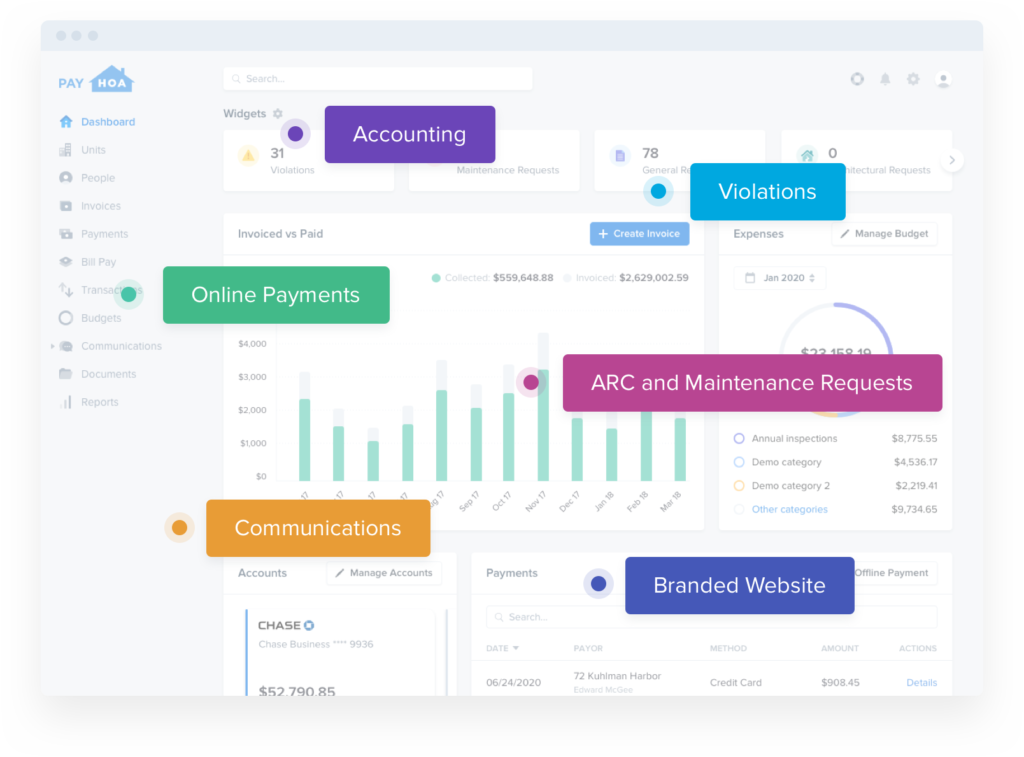
Plus, managing your HOA goes beyond invoicing. QuickBooks and other general accounting software don’t offer anything that makes it easier to run your HOA. HOA accounting software bridges the gap between accounting and everything else it takes to run your community, a centralized system for finances, maintenance requests, tracking violations, vendor management, communications, and more.
To show you the gaps and inefficiencies in applying a solution like QuickBooks, we’ll compare QuickBooks and PayHOA side-by-side.
Or you could see for yourself with a 30-day free trial

you just might not know it.
Can you use QuickBooks for an HOA?
Yes. QuickBooks is a capable accounting tool, and many small, self-managed associations run their books on it for years without a problem. If your HOA has just a few homes, one regular assessment, and a treasurer who already knows QuickBooks, it can do the job.
What QuickBooks handles well
- A general ledger, bank connections, and bank reconciliation
- Tracking and paying vendor bills
- Standard reports, like a profit and loss statement and a balance sheet
- Budgets and class tracking, on the Plus plan and above ($140/mo and up)
- A format most accountants and tax preparers already work in
Where it gets harder is the work that’s unique to associations. QuickBooks organizes records around customers instead of units, and association rules like late fees, notice requirements, and reserve restrictions are yours to set up and enforce. The comparison below shows where those gaps appear day to day.
5 ways QuickBooks compares to PayHOA
Here’s how QuickBooks and PayHOA compare on six parts of running an HOA, from how records are organized to how reserve funds are handled. Each section covers how QuickBooks handles the job, then how PayHOA’s self-managed association software handles it. Jump to any section from the list below.
- Customers vs. units
- Individual vs. bulk invoicing
- Manual vs. automated correspondence
- Transactional vs. communal
- Static vs. dynamic
The table below sums up the differences at a glance.
| Area | QuickBooks | PayHOA |
| Records | Organized by customer. A new owner means a new customer record. | Organized by unit and owner, with a history kept for each unit. |
| Dues billing | Default late fee setting. Batch invoicing only on the Advanced plan ($340/mo). | Bulk invoicing with automatic late fees and early-payment discounts. |
| Communication | Notices outside billing need separate tools. | Email, text, and mailed letters, tracked alongside the books. |
| Owner access | Online invoice payment with QuickBooks Payments. No owner portal. | Owner portal for payments and payment history, documents, message boards, and requests. |
| Industry fit | Built for businesses in general. HOA features come from third-party apps. | Built for HOAs and other community associations. |
| Starting price | $38/mo. Budgets and class tracking from $140/mo. | $49/mo billed yearly, priced by community size. |
1. Customers vs. Units
QuickBooks was built around the concept of a customer.
QuickBooks was built around the concept of a customer, that is, a person or business paying or invoicing for the products or services of another person or business.
QuickBooks fails to recognize one more important increment unique to an HOA — units.
Each time a unit is sold and a new occupant moves in, you’ll have to create a new customer within QuickBooks. This type of recordkeeping quickly becomes complicated and disjointed. Over time, you’ll have multiple customers with the same address, and you can’t compile documentation by unit, only by customer.
PayHOA keeps records on both a unit and individual basis.
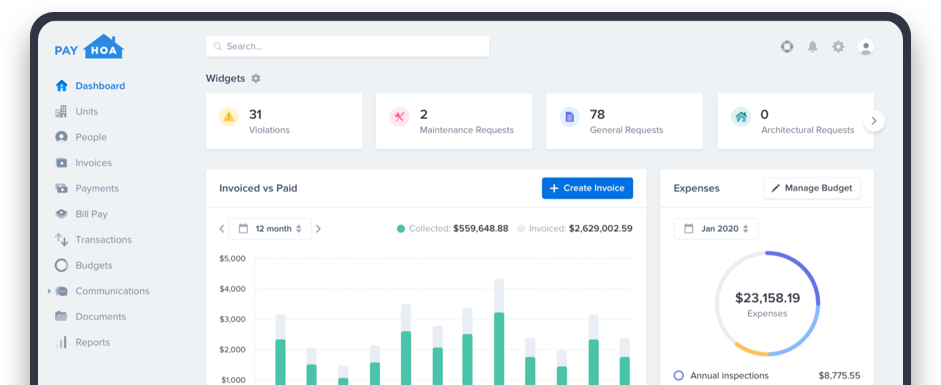
PayHOA keeps records on both a unit and individual basis, making it easy to associate individuals with a particular unit. PayHOA logs and organizes these records automatically, establishing a documented history of ownership, maintenance, and payment activity at no extra effort to you.
You can also tailor invoices and fees by unit type and other specifications. In the PayHOA platform, you’ll create tags and custom fields so your HOA can segment units and owners with a high level of customization.
2. Individual vs. Bulk Invoicing
QuickBooks was designed to send one invoice at a time.
It certainly wasn’t built to invoice a community of dozens if not hundreds of units on a set schedule.
QuickBooks Online can add a default late fee to overdue invoices, but matching it to your governing documents and any state notice rules is up to you. Outside the Advanced plan ($340/mo), QuickBooks Online also creates invoices one customer at a time, so it will take more time to properly invoice homeowners, and it will take more time to receive homeowner dues.
PayHOA makes bulk invoicing a breeze.
In fact, mass invoice functionality is the core component of almost any HOA accounting software platform.
With PayHOA, invoices go out on time each month. They are sent directly to homeowners through their PayHOA portal, allowing them instant access and more freedom to pay when and how they want. They can even enable autopay.
Most importantly, PayHOA lets you customize invoices in several ways.
- Apply a late fee that automatically kicks in if the invoice isn’t paid within a time of your choosing.
- Apply a discount if the invoice is paid early.
- Designate the invoice by revenue category, like insurance or utilities, or create your own category.
- Assign an end date, so homeowners don’t receive an invoice after they’ve sold their home or their lease is up.
- Set billing date, due date, and how often invoices should be sent
These features make invoicing simpler for you and for homeowners. Because they send and update automatically, invoices are always accurate and current, thus easier for homeowners to pay.
3. Manual vs. Automated Correspondence
QuickBooks doesn’t capture communications between the biller and the payer.
Though it serves its purpose as a personal bookkeeping tool, to engage with homeowners outside of billing, you’ll have to resort to other tools that are disconnected from your accounting platform.
QuickBooks falls short of serving as an informational hub for managing your HOA. Then again, it was never meant to serve this purpose.
PayHOA unifies the communication channels between the HOA board and homeowners.
PayHOA handles mass communications just as easily as mass invoicing. It’s never been easier to keep homeowners updated with community upgrades, construction progress, or other neighborhood alerts.
As an HOA accounting platform, all of this communication is contained within the PayHOA platform, right alongside accounting activity. The platform functions as your command center, reaching homeowners in an instant. Through their individual portals, homeowners can respond and engage in real-time.
Here are just a few ways you can correspond with homeowners through HOA:
- Send mass emails, texts, and voicemails from within the platform.
- Send direct mail like paper invoices or print newsletters, at the click of a button.
- Issue violations
- Receive maintenance and architectural requests.
The PayHOA platform tracks your correspondence. You can see who has received and opened your messages, and you’ll be notified if a message couldn’t be delivered due to, say, an incorrect phone number or out-of-use email address.

4. Transactional vs. Communal
QuickBooks is an accounting-only platform.
QuickBooks may be perfectly adequate for a business’s accounting needs. However, a business involves way more than just transactions. A business needs to gauge progress on projects, produce branded materials, respond to customer communications, track inventory, and so forth.
To meet these needs, businesses develop their own stack of products and practices, forcing them into cohesion with one another. You’ve likely been doing the same to manage your HOA.
PayHOA speaks to the whole range of an HOA’s needs.
Yes, PayHOA covers all the accounting bases. We make it easy to import transaction history and other existing information about your HOA. The PayHOA platform generates the full range of financial reports, from budgets to balance sheets and beyond. Of course, you can create your own unique reports, too.
But a community is so much bigger than dues and fees. Homeowners who feel heard, engaged, and included are happier overall.
Collections are a huge piece of this puzzle because homeowners should know how the HOA board spends their dues. By bringing transparency to payments, PayHOA helps homeowners see how their money helps improve their communities.
Beyond accounting, each homeowner’s PayHOA portal acts as their go-to resource for information and feedback about the HOA. From covenants and foundational documents to community calendars and surveys, PayHOA helps homeowners take an active part in shaping their neighborhoods.
5. Static vs. Dynamic
QuickBooks is built for every kind of business, with little innovation.
QuickBooks may regularly update its products to work within a constantly evolving tech environment, but at the end of the day, QuickBooks doesn’t offer users much more than it did when it premiered in 1983. While they have added new features, those features are built for businesses in general, not for associations. And the tool itself was designed to fit within a scheme of other tools that each play their own part in the operation of a business.
As a tool that isn’t specialized toward a particular industry, QuickBooks leaves it up to its customers to use it as best as they can manage. Because QuickBooks may apply to many different businesses and scenarios, it can’t grow to serve any industry in particular, especially not that of an HOA. To get HOA features, you’d need to add on third-party apps, but each one is another subscription and another system to keep in sync.
PayHOA is constantly evolving to serve HOAs better.
If you’re facing a unique challenge, our team can help you find a solution. In fact, as we find new ways to solve new problems, we update our capabilities to make that solution available to all PayHOA customers.
Our support team knows what it takes to run an HOA. That’s why we’ve packed it with extra tools to make the job easier.
- Readymade templates for maintenance requests, violations, and architectural requests
- Make vendor profiles to pay third-party vendors instantly via check or ACH
- Create a website for your HOA with our in-platform website builder
- Ask questions and offload tasks to Gable, your HOA’s AI assistant
When you sign up for PayHOA, your experience will only improve with time and continue to offer new ways to run your HOA smoothly.
Frequently asked questions
Is QuickBooks good for an HOA?
It can be, for a small association with simple finances and a treasurer who already knows QuickBooks. It handles the general ledger, bank reconciliation, and standard reports well. It’s a weaker fit once you need records by unit, billing for every home at once, late fees that follow your governing documents, an owner portal, and communication tools.
Do small HOAs need QuickBooks?
No. Every HOA needs accurate books, but QuickBooks is only one way to keep them. Some boards use spreadsheets, some use QuickBooks, and some use HOA software that combines the books with dues collection, homeowner communication, and management tools that cover things like violations and requests. Choose the option your treasurer can keep current and your accountant can work with.
How much is QuickBooks for an HOA?
QuickBooks Online runs from $38 a month for Simple Start to $340 a month for Advanced, at Intuit’s regular prices. HOAs that want budgets and class tracking to separate their funds need Plus, at $140 a month. Check Intuit’s pricing page for current offers and price changes.
What are people replacing QuickBooks with?
Most boards that leave QuickBooks move to HOA software, which is built around units and owners instead of customers. These platforms combine the books with dues billing, late fees, an owner portal, and homeowner communication. Some associations keep QuickBooks for their accountant and run day-to-day work in HOA software.
How do I categorize HOA fees in QuickBooks?
Most associations record regular assessments as income, give special assessments, late fees, and other charges their own income accounts, and track reserve money in separate accounts. The right setup depends on your budget and governing documents.
The Bottom Line
You might think that such a comprehensive solution may come with a comprehensive price tag, but it doesn’t. HOA accounting software comes at a negligible cost.
QuickBooks costs more than you think.
QuickBooks Online starts at $38/mo for Simple Start, but includes only a limited feature set and one user. If you want to build a budget or track classes, which many treasurers use to keep funds separate, you’ll need QuickBooks Online Plus at $140/mo. Batch invoicing requires the highest tier, Advanced, which costs $340/mo.
PayHOA offers you more at a more affordable cost.
PayHOA gives you the full suite of features from $49 a month (billed yearly).
The PayHOA platform doesn’t just provide value to the HOA board. It makes it more convenient for homeowners to fulfill their obligations, too. Start your free 30-day trial and see how PayHOA can help you run your community smoothly.
PayHOA offers an HOA management software solution for HOAs of any size or managerial priorities. To find out if PayHOA fits all your HOA management needs, try our software free for 30 days.